


DW Jukebox (unofficial mirror)
DWJukebox Downloads, Skins and Retro Jukebox Archive
The original DWJukebox website has vanished, and the old home eventually stopped being useful altogether. For a project with this much cabinet-building history behind it, that is a proper shame. DWJukebox was not just another music player. It was one of the best ways to turn a PC, touchscreen, arcade cabinet or custom-built wooden jukebox into something that actually felt like a real mechanical music machine.
So Arcade Punks is stepping in as the download mirror, archive point and preservation hub. We have revived the working downloads, gathered the classic skins, added missing community files, and started building this into the clearest place online to grab DWJukebox and its best extras.
If you want the final DWJukebox release, classic cabinet skins, rare community packs, Hound Dog extras, LHUPA specialty skins or future restored downloads, this is now the page to bookmark.
Final DWJukebox release
Archive files and extras
Cabinet, wallbox and touchscreen styles
Hosted by Arcade Punks
Why this mirror matters
DWJukebox was originally known as DOSCab and WinCab Jukebox, and it became a proper favourite with people building real-world jukebox cabinets and arcade-based music machines. It supports classic jukebox behaviour, custom skins, cabinet controls, keyboard encoders, gamepads, mouse input and touchscreen setups. That makes it perfect for arcade cabinets, MAME builds, wall-mounted jukebox projects, converted dead jukebox shells and DIY retro music stations.
When the original site disappeared, it left a lot of useful files scattered, broken or at risk of being lost. Arcade Punks already preserves retro gaming builds, arcade front ends, community projects and rare downloads, so keeping DWJukebox alive here makes total sense. This page is designed to be more than a quick upload dump. It is being built as the clean, obvious and reliable home for DWJukebox downloads.
Core DWJukebox Download
Start here if you need the actual jukebox software before grabbing skins and add-ons.
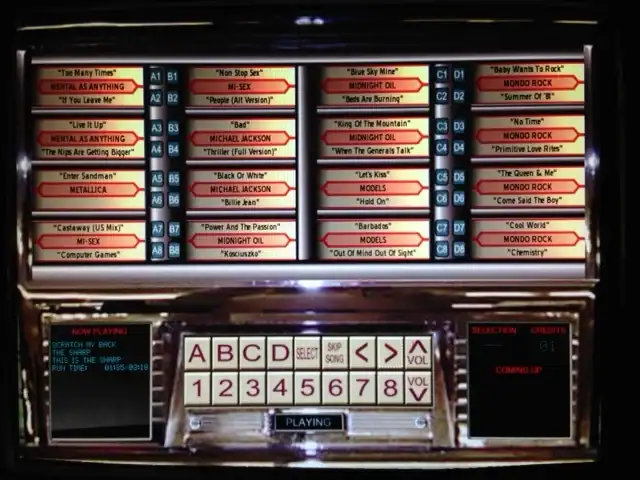
DWJukebox 3.41 Final Release
Creator: DWJukebox Project
DWJukebox is an MP3 and OGG Vorbis player built to simulate a real jukebox rather than act like a standard media player. It can run on a normal DOS or Windows PC, but it really comes alive inside a jukebox cabinet, arcade cabinet, touchscreen build or resurrected vintage shell.
It supports classic singles-style jukebox layouts, album-based CD jukebox layouts, custom skins and multiple control options. For anyone building a retro music cabinet, this is the essential base download.
Featured DWJukebox Skins
These are the main skins and classic community releases we have mirrored so far. Some are cabinet-style, some are touchscreen-friendly, and some are simply too good to let disappear.

Radiojuk
Creator: Brian Dermody
A beautiful widescreen skin based on an antique German radio. It includes a startup sound of a German shortwave radio station, giving it a proper old-world radio cabinet feel.

Psvga / PhotoSkin
Creator: Brian Dermody
A classic jukebox frame wrapped around alternating custom photos. It is designed for personalisation, making it a lovely option for wall-mounted units or family music builds.

CDBox 2-up Vertical
Creator: Eric Bateman
A vertical version of the CDBox 2 skin, redesigned for rotated or portrait display cabinet builds.

CDBox 2
Creator: Eric Bateman
A CD-based skin with four discs displayed vertically and a strong 80s jukebox flavour.

CDBox 4-up
Creator: Eric Bateman
A four-disc album layout with a radio function indicator and large touchscreen pushbuttons.

Metalbox
Creator: Eric Bateman
A recovered Box series skin with a smart monochrome look that lets album art stand out beautifully.

LCARS
Creator: Ben Johnson
A Star Trek-inspired LCARS skin, built around the Library Computer Access and Retrieval System look. It is especially suited to touchscreen arcade cabinets and sci-fi themed jukebox projects.

WoodcabBox
Creator: Bob
A classic wooden cabinet skin for DWJukebox, giving modern builds the feel of a vintage 1940s or 1950s wood and chrome jukebox.

SBM-100
Creator: D. Beeks
A widescreen old letter and button pressing skin with a classic jukebox panel layout. It has that proper old selector feel and looks superb on a cabinet display.

Neonbox
Creator: Eric Bateman
Bright, bold and built for impact. Neonbox has a colourful arcade-jukebox look that instantly lifts a cabinet setup.

Wallbox
Creator: Eric Bateman
A compact wallbox-style skin designed to look like a small wall-mounted jukebox selector.

70s Theme
Creator: Jeron Vissers
A bold 70s-inspired DWJukebox theme with a strong period look. It is funky, warm, nostalgic and perfect for a retro music build with personality.
Hound Dog DWJukebox Collection
Hound Dog brings a brilliant collection of skins, and the sound pack is important. If you use any of the Hound Dog skins, grab the sounds first so the full package works as intended.

Hound Dog Sound Pack
Creator: Hound Dog
Required for the Hound Dog skins. Download this before using JukeMat, Music Box, Orange Box, Wall Juke or the Wurly skins.

JukeMat
Creator: Hound Dog
A classic jukebox skin with strong cabinet styling and a proper retro feel.

JukeMat2
Creator: Hound Dog
A second JukeMat variation, giving you another classic jukebox layout to try.

Music Box 1
Creator: Hound Dog
A warm, traditional skin with music box styling and classic cabinet charm.

Music Box 2
Creator: Hound Dog
A companion to Music Box 1, offering another traditional cabinet-style option.

Orange Box
Creator: Hound Dog
A bright and lively skin with strong orange cabinet styling. Great if you want something that pops.

Wall Juke
Creator: Hound Dog
A wall-jukebox style skin that suits compact selector-style builds and diner-inspired projects.

Wurly 1
Creator: Hound Dog
A Wurlitzer-inspired skin with proper vintage jukebox energy.

Wurly 2
Creator: Hound Dog
A second Wurlitzer-inspired skin, giving you another classic cabinet option.
LHUPA DWJukebox Skin Collection
The LHUPA archive is not just one skin. It is a proper collection of specialist DWJukebox work, including Astral, Schenectady, Zenbox, lighting variants, French and English versions, modified packs and a very niche Wurlitzer wallbox adaptor skin.

LHUPA Astral
Creator: LHUPA
A futuristic skin with a custom cabinet look and a strong sci-fi style. The archive contains the Astral skin files, modified Astral package and screenshot material.

LHUPA Schenectady
Creator: LHUPA
A major skin pack with English and French options, control files, skin assets, lighting choices and supporting sound files. This is one of the bigger and more complete LHUPA entries.

LHUPA Schenectady Backlight Option
Creator: LHUPA
A Schenectady variation built around the real backlight option. This is included inside the main Schenectady download, making it ideal if you want the display to feel more like a lit cabinet face rather than a flat screen skin.

LHUPA Schenectady Frontuplight Option
Creator: LHUPA
A front-up-light variation of the Schenectady skin, giving the layout a different cabinet lighting feel. This version is included inside the main Schenectady download.

LHUPA SCIII WLHS 160-F Wurlitzer Wallbox Adaptor
Creator: LHUPA
A specialist skin based around the Wurlitzer FW 160-161 wallbox adaptor concept. This is one for the real jukebox heads.

LHUPA Zenbox
Creator: LHUPA
A stylish skin package with multiple lighting moods and panel variations. Zenbox is one of the most visually interesting packs in the LHUPA archive.

LHUPA Zenbox Natural
Creator: LHUPA
The natural lighting Zenbox variant. A cleaner option if you want the Zenbox style without pushing the colour too hard. This version is included inside the main Zenbox download.

LHUPA Zenbox Orange
Creator: LHUPA
The orange translucent Zenbox variant. Warm, punchy and perfect if you want a cabinet display that feels lit from within. This version is included inside the main Zenbox download.

LHUPA Zenbox Red
Creator: LHUPA
The red Zenbox variant with a stronger glowing effect. This is the one to use when you want the skin to shout from across the room. This version is included inside the main Zenbox download.